

MATAN AI — system architecture
Four views of the same system, following the AWS architecture-diagramming taxonomy — a system view, an application data-flow view, a frontend/feature view and a deployment view.
Jump to: 1. System architecture · 2. Event → alert · 3. Feature map · 4. Deployment & security
1. System architecture
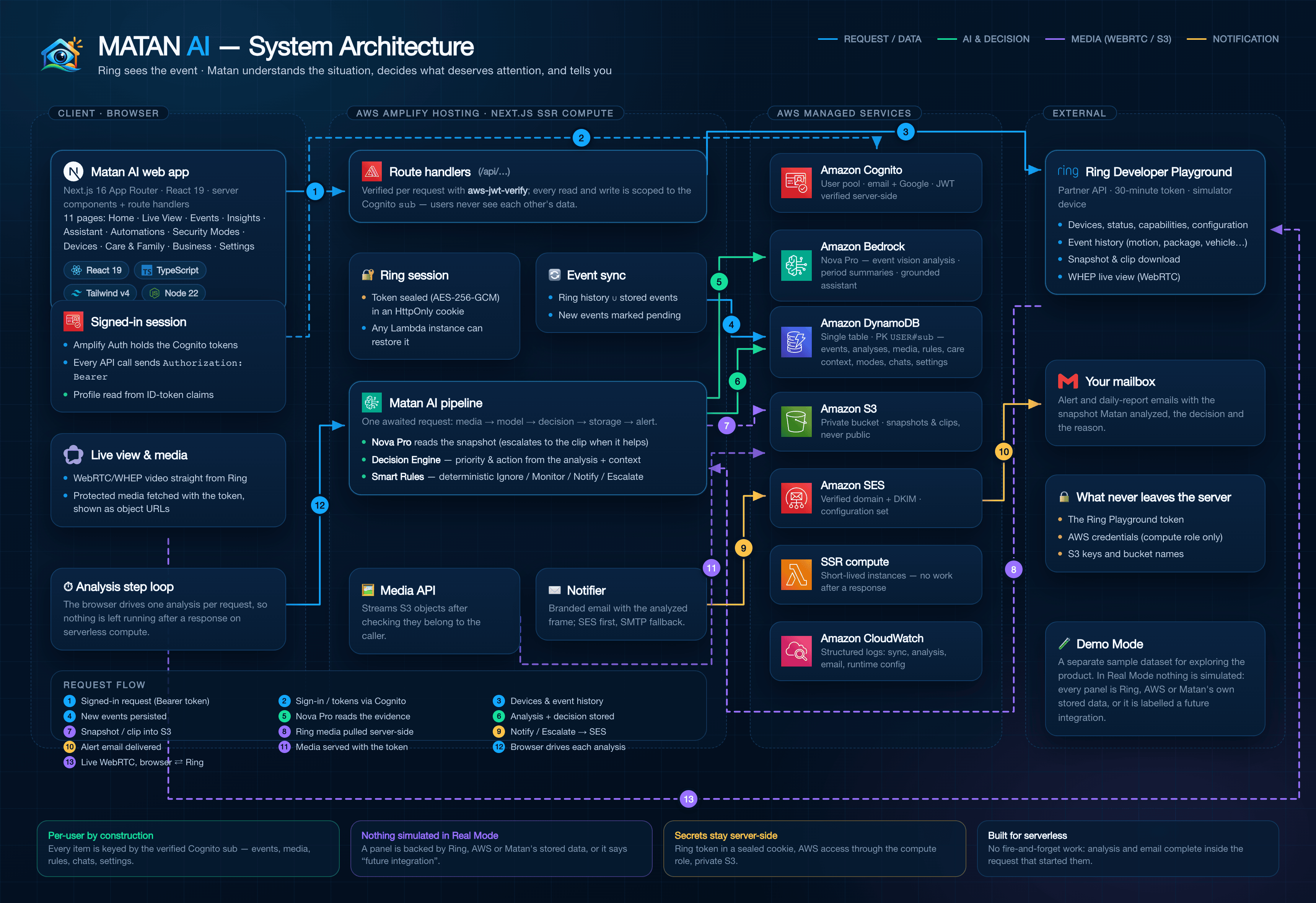
Source:
architecture.html· logos inlogos/· the PNG is a 2× render of that page (see Regenerating below).
The four lanes
| Lane | What runs there |
|---|---|
| Client · Browser | The Next.js 16 / React 19 app. Holds the Cognito session (Amplify Auth), plays the Ring WebRTC stream, fetches protected media with the access token, and drives one analysis step per request. |
| AWS Amplify Hosting · Next.js SSR compute | Every /api/… route handler. Verifies the Cognito token (aws-jwt-verify), keeps the Ring Playground token sealed in an HttpOnly cookie, syncs Ring events, and runs the Matan pipeline (Nova Pro → Decision Engine → Smart Rules) and the notifier. |
| AWS managed services | Cognito (identity), Bedrock/Nova Pro (analysis, summaries, assistant), DynamoDB (single table, everything keyed by the user's sub), S3 (private media), SES (alerts), CloudWatch (structured logs). Credentials come from the Amplify compute role — no long-lived keys. |
| External | The Ring Developer Playground (Partner API: devices, history, snapshot/clip, WHEP live view) and the user's mailbox. |
Request flow
- Signed-in request — the browser calls
/api/…withAuthorization: Bearer <access token>. - Sign-in / tokens — Amplify Auth talks to Cognito directly (email + password, or Google through the managed login).
- Devices & event history — the server calls the Ring API with the Playground token (never exposed to the browser).
- New events persisted — Ring history is merged with stored events; new ones are marked pending analysis.
- Nova Pro reads the evidence — snapshot first, escalating to the clip when it adds information.
- Analysis + decision stored — Nova's structured result, the Decision Engine's priority/action and the Smart Rules outcome are written to DynamoDB.
- Snapshot / clip into S3 — media is stored under
users/{sub}/events/{eventId}/…in a private bucket. - Ring media pulled server-side — the image/clip download happens on the server; the browser never holds a Ring token.
- Notify / Escalate → SES — only decisions that warrant it produce an email (SMTP fallback while SES is in sandbox).
- Alert email delivered — branded email with the analyzed frame, the decision and the reason.
- Media served with the token —
/api/matan/media/:idchecks ownership, then streams the S3 object. - Browser drives each analysis — the sync only records pending work; the browser calls
/api/matan/auto/step, which completes one analysis inside that request (serverless compute is frozen after a response). - Live WebRTC — SDP is exchanged through the server, then media flows directly between the browser and Ring's edge.
Design rules the diagram encodes
- Per-user by construction — every stored item is keyed by the verified Cognito
sub. - Nothing simulated in Real Mode — a panel is backed by Ring, AWS or Matan's own stored data, or it is labelled a future integration.
- Secrets stay server-side — Ring token in a sealed cookie, AWS access through the compute role, S3 private with Block Public Access.
- Built for serverless — no fire-and-forget work: analysis and email complete inside the request that started them (see
../AWS_DEPLOYMENT.md).
2. Event → alert (application data flow)
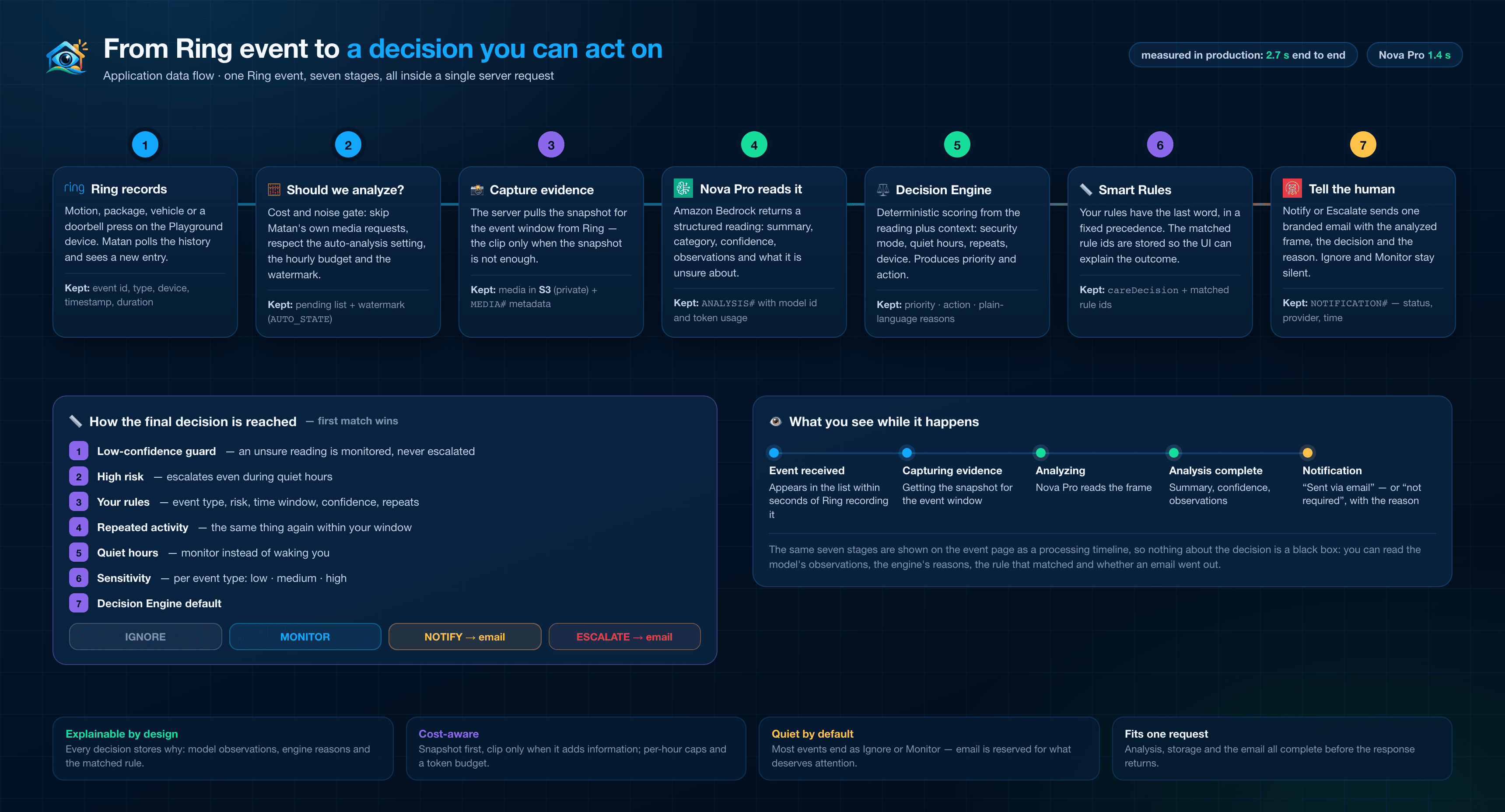
One Ring event, seven stages, all inside a single server request: the cost gate, the snapshot, Nova Pro's reading, the Decision Engine, your Smart Rules and the email — with the decision ladder that produces Ignore / Monitor / Notify / Escalate. Source: lifecycle.html.
3. Feature map (frontend architecture)
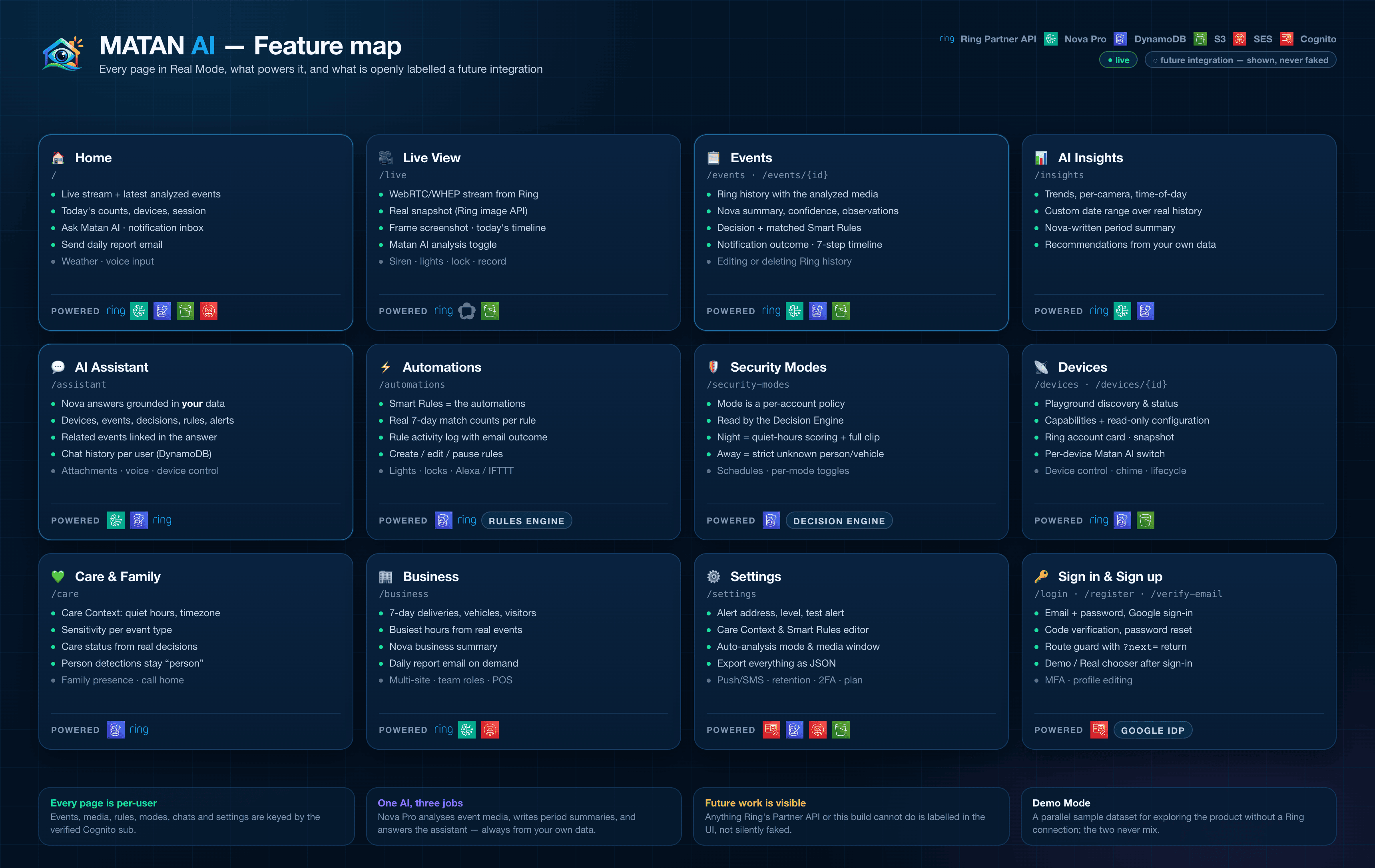
Every page in Real Mode, what powers it (Ring, Nova, DynamoDB, S3, SES, Cognito) and what is openly labelled a future integration. Source: features.html.
4. Deployment & security
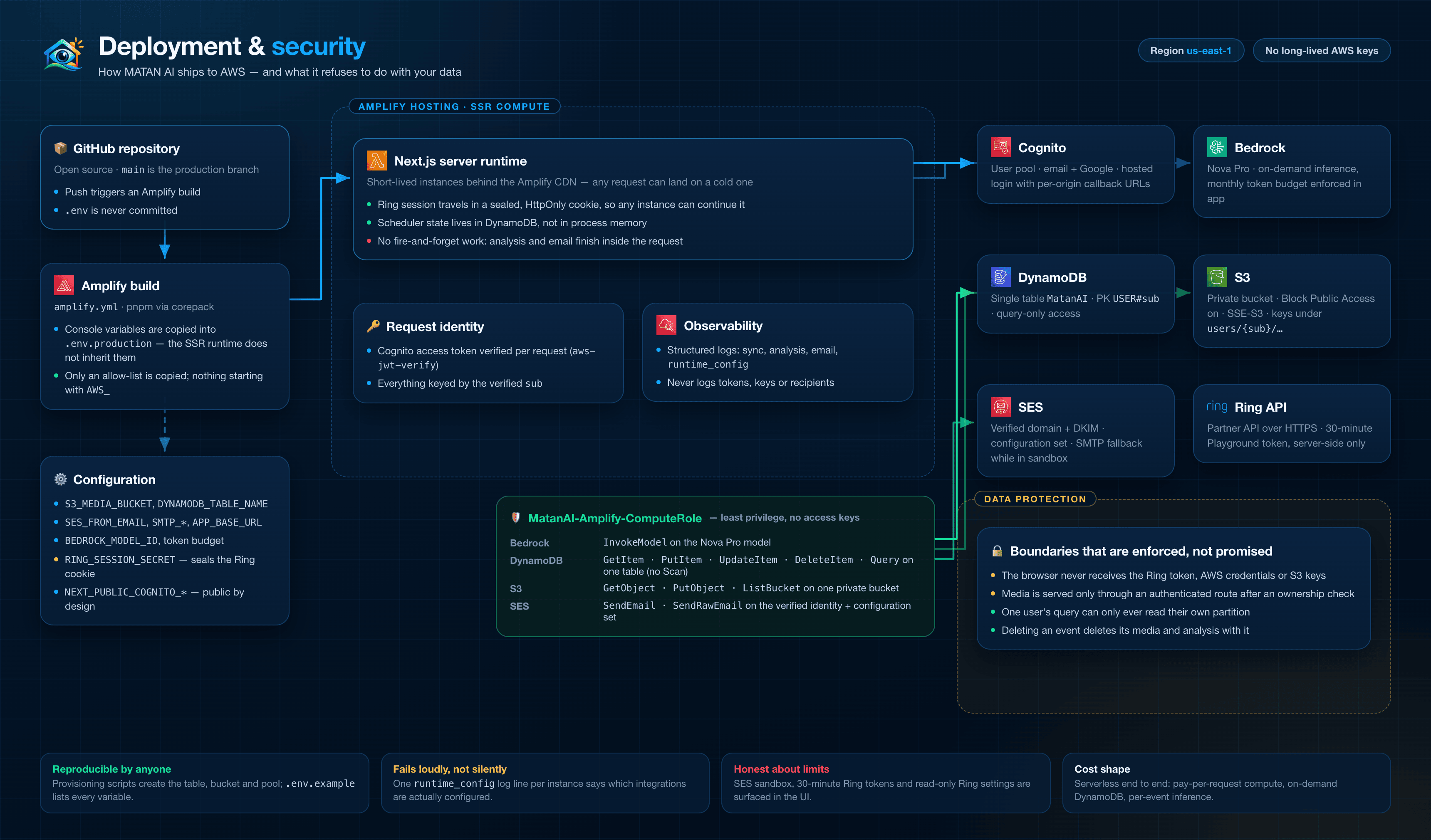
GitHub → Amplify build → SSR compute with an IAM compute role, the environment variables that matter, the least-privilege policy and the boundaries the app enforces. Source: deployment.html. See also ../AWS_DEPLOYMENT.md.
Regenerating
Each diagram is an HTML file rendered to PNG at 2× with Chrome, then compressed with pngquant:
# architecture.html → matan-ai-architecture.png (same pattern for the other three)
node -e '
const { chromium } = require("playwright");
(async () => {
  const b = await chromium.launch({ channel: "chrome" });
  const p = await (await b.newContext({ viewport: { width: 1720, height: 1180 }, deviceScaleFactor: 2 })).newPage();
  await p.goto("file://" + process.cwd() + "/docs/architecture/architecture.html", { waitUntil: "networkidle" });
  await p.locator("#canvas").screenshot({ path: "docs/architecture/matan-ai-architecture.png" });
  await b.close();
})();'
Asset credits
| Asset | Source | Terms |
|---|---|---|
| Amazon Cognito, DynamoDB, S3, SES, Lambda, CloudWatch, Amplify icons | AWS Architecture Icons (via icon.icepanel.io) | © Amazon Web Services — used to identify AWS services |
| Amazon Bedrock icon | awslabs/aws-icons-for-plantuml | Apache-2.0 repository, AWS trademark |
| Ring, Next.js, React, TypeScript, Tailwind CSS, Node.js, Gmail, WebRTC | Simple Icons (cdn.simpleicons.org) | CC0 1.0 — brand marks remain the property of their owners |
Logos are used only to identify the technologies in this diagram; no endorsement is implied.